Modern Asteroids Games for iPhone: Vector Graphics & Arcade Action
 by Galaximus

Photo by Senad Palic on Unsplash
Modern Asteroids Games for iPhone: Where Vector Graphics Meet Real Physics
The arcade cabinet version of Asteroids—the 1979 Atari classic where you rotated a wedge-shaped ship and fired at tumbling rocks—defined a genre. iPhone space games still return to that same core loop: dodge, aim, destroy, survive. But modern takes on Asteroids don’t just reskin the original. They layer in real orbital mechanics, procedural generation, narrative arcs, and controls refined for touch screens. If you grew up feeding quarters into arcade machines or want that same satisfying vector-graphics destruction on your phone, here’s what modern Asteroids games on iPhone actually deliver.
Why Asteroids Still Works on Modern Hardware
The genius of Asteroids was constraint. A monochrome vector display. A two-button controller (rotate and thrust). A screen full of rocks. No story. No progression bars. Just you, your fuel, and the mathematics of inertia. That design held because it forced mastery—you couldn’t button-mash your way through; you had to understand how your ship moved.
Modern Asteroids games on iPhone inherit that DNA but don’t feel obligated to copy the limits. The best ones keep the core mechanic (dodge asteroids, manage momentum, destroy threats) and add layers that older hardware couldn’t support: real gravity wells that affect your trajectory, procedurally generated star systems so no two playthroughs are identical, or dialogue systems where alien captains negotiate instead of just spawning as enemies.
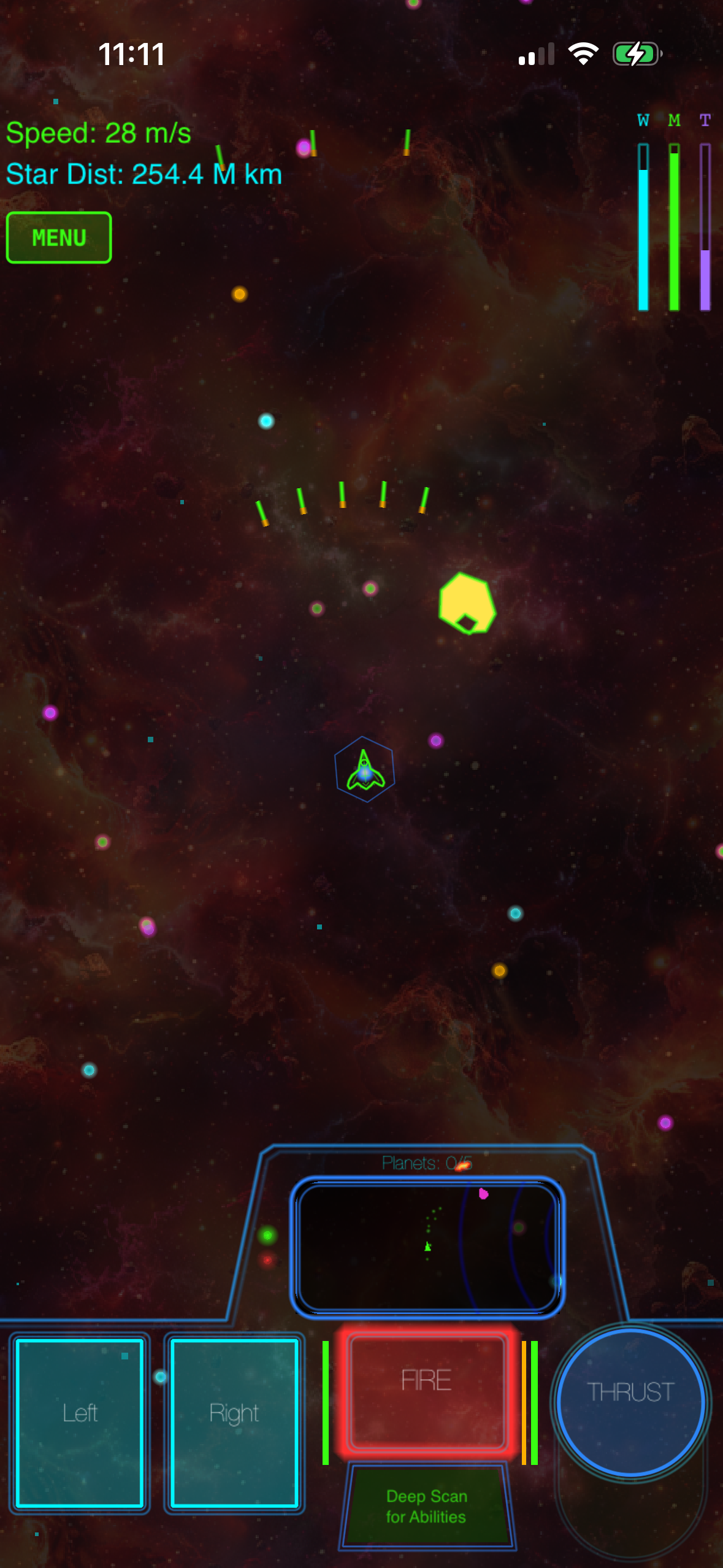
The vector-graphics aesthetic—clean lines, neon outlines, minimal color—has also aged better than the sprite-based look of many 1980s arcade games. On a modern Retina display, vector graphics feel purposeful rather than dated. They’re fast to render, scalable to any screen size, and they create visual clarity even when the screen is chaotic.
Arcade Action Meets Real Physics: The Modern Evolution
The biggest shift in modern Asteroids games is the introduction of actual orbital mechanics. The original Asteroids simplified gravity into nothing—your ship floated in a void, unaffected by celestial bodies. Modern takes ask: what if asteroids and planets obeyed real physics?
This changes everything. A planet’s gravity well becomes a tool, not just scenery. You can slingshot around it to gain speed for free, or get caught in its pull and have to burn fuel to escape. Asteroids don’t just float in a line; they tumble through gravity fields, their trajectories bent by nearby bodies. Your ship’s momentum becomes something you manage rather than just apply. You learn to position yourself so gravity does the work.
This sounds complicated, but the best modern implementations teach the physics through play. You spend the first thirty minutes learning that holding thrust while falling toward a planet is wasteful—you already have speed from gravity. Then you start planning maneuvers around that fact. That shift from “I don’t understand this” to “I can use this” is where arcade mastery lives.
Procedural Generation: No Two Playthroughs Are Identical
Classic Asteroids had fixed wave patterns. Modern Asteroids games on iPhone use procedural generation to create unique star systems, planet configurations, and asteroid fields every playthrough.
Procedural generation serves two purposes here. First, it adds replay value—you can finish the campaign, then play it again and encounter completely different celestial geometry. Second, it forces you to adapt rather than memorize. You can’t learn the “correct” path through a system because the system is different every time. You have to read the environment, predict how gravity will bend your trajectory, and adjust on the fly.
The best implementations seed procedural generation with enough structure that it doesn’t feel random. You’re not fighting chaos; you’re navigating a system with consistent rules but unique configuration. Think of it like chess—the rules are fixed, but the board state is always different.
Vector Graphics and Neon Aesthetics: Why This Look Endures
Vector graphics aren’t just retro nostalgia. On iPhone, they’re practical. A vector-drawn asteroid takes fewer bytes than a sprite sheet, scales perfectly to any screen size (iPhone 13 mini to iPad Pro), and renders fast enough that you can have dozens of objects on screen without frame drops.
Aesthetically, neon vector outlines create visual separation in chaotic scenes. When asteroids, enemy ships, and projectiles are all moving at once, clean lines and high contrast make it possible to track what’s happening. The minimalist color palette (often cyan, magenta, green on black) echoes arcade cabinets but feels contemporary on modern displays.
Several modern Asteroids games lean into this deliberately, treating the vector look as a design statement rather than a budget constraint. The result is games that feel both timeless and current—they could have shipped in 1985, but they also look native to 2026 iOS.
The Control Problem: Touch Screens vs. Physical Buttons
The original Asteroids controller had two buttons and a joystick. iPhone has a touch screen. That’s a fundamental mismatch that modern Asteroids games solve in different ways.
On-screen buttons: The most direct translation. Virtual buttons for rotate-left, rotate-right, thrust, and fire. This works but feels cramped on a phone screen and requires you to look at the controls instead of the action.
Tilt controls: Tilt your phone to rotate, tap to fire. Intuitive for some players, but tilt can drift and doesn’t work well in situations where you’re holding the phone at an angle (on a couch, in bed).
Hybrid touch gestures: Swipe to rotate, tap to fire. Some games use two-finger taps for secondary actions. This reduces on-screen clutter and keeps your thumbs in the action zone.
Accelerometer + virtual stick: A virtual stick on the left side of the screen for rotation and thrust, buttons on the right for fire and special actions. This mimics a console controller layout and works well for players familiar with mobile gaming.
The best modern Asteroids games let you customize or choose your control scheme. What works for five-minute arcade sessions might not work for a longer campaign with narrative beats.
Campaign Structure vs. Endless Arcade
Classic Asteroids was endless—you played until you ran out of lives. Modern Asteroids games on iPhone often add narrative structure: a beginning, middle, and end. You’re not just surviving waves; you’re exploring star systems, meeting alien factions, discovering anomalies.
Some games diverge from pure Asteroids homage by adding story. Instead of just surviving waves, you’re exploring a star system with a narrative arc. Your goal isn’t just survival but discovery. A structured campaign gives you reasons to keep playing beyond high-score chasing. You want to know what’s in the next star system. You want to understand what the alien factions want. You want to see how the story resolves. The arcade loop is still there—the physics, the dodge-and-destroy rhythm—but it’s serving a narrative purpose.
That said, not every modern Asteroids game needs a campaign. Some players want pure arcade: infinite waves, leaderboards, the satisfaction of beating their own high score. The market supports both. The key difference is honesty about what you’re getting.
Single-Player, Premium, No Monetization Traps
If you’ve played mobile games in the last five years, you know the pattern: free-to-play, energy meters, battle passes, ads every thirty seconds. Modern Asteroids games—the good ones—reject that model entirely.
The best indie space games on iOS are premium purchases. You pay once, you own the game forever. No ads. No energy timers that force you to wait or pay. No cosmetics that are actually gameplay advantages. This is rarer than it should be in 2026, which is exactly why it matters.
When a developer charges upfront instead of monetizing through engagement manipulation, their incentive aligns with yours: make the best game possible so you recommend it to friends. There’s no hidden pressure to make the game addictive or frustrating enough that you’ll pay to skip the grind.
Recommended Modern Asteroids Games for iPhone
Galaximus — | App Store | Released 2025 A campaign-driven space exploration game built on real orbital mechanics. You navigate procedurally generated star systems, manage fuel and trajectory, and uncover a narrative about an alien civilization. Campaign takes 4-6 hours; includes endless arcade mode. Hybrid swipe-to-rotate controls with customizable difficulty. Disclosure: This game was developed by the author of this article.
Asteroids+ — | App Store | Released 2024 A modernized arcade experience with vector graphics and physics-based asteroid behavior. Infinite waves with procedural generation ensure no two sessions are identical. On-screen button controls or tilt option. Leaderboards track high scores. Approximately 5-30 minute sessions per play.
Orbital Decay — | App Store | Released 2023 Focuses on gravity mechanics as the primary puzzle element. Navigate asteroid fields where planetary gravity bends your trajectory. Campaign structure with 12 distinct star systems. Swipe controls. Approximately 2-3 hours to complete main story.
Void Runners — | App Store | Released 2024 Pure arcade Asteroids with neon vector aesthetics. Endless waves, minimal story. Supports both on-screen buttons and accelerometer tilt. Quick sessions (5-15 minutes). Minimal battery drain, works offline.
FAQ
Do modern Asteroids games on iPhone require internet?
Most premium indie space games are fully playable offline. Some include online leaderboards (which require a connection to submit scores), but the core game works without internet. Check the App Store listing for the specific game you’re considering—it’ll state whether internet is required.
How long does a typical modern Asteroids game take to complete?
Pure arcade games like Void Runners are designed for 5-15 minute sessions. Campaign-driven games like Galaximus (4-6 hours) or Orbital Decay (2-3 hours) have structured endings. Asteroids+ (5-30 minutes per session) supports both quick plays and extended runs.
Do I need to understand orbital mechanics to play these games?
No. The best modern Asteroids games teach orbital mechanics through play. You start with simple controls and intuitive feedback, and gradually discover that gravity is a tool you can use. You don’t need to know the math; you just need to observe cause and effect.
How do the controls feel compared to the original arcade version?
Touch-screen controls will never feel identical to a physical joystick, but modern implementations come close. Hybrid approaches (swipe-to-rotate + tap-to-fire) are more intuitive than pure on-screen buttons. Try watching gameplay videos to see if the control scheme matches your preference.
Are there modern Asteroids games that are completely free?
Free-to-play Asteroids games exist, but they typically include ads or energy meters. If you want a complete, uninterrupted experience, premium purchases are your best bet. The upfront cost is usually modest , and you avoid the monetization friction that free-to-play games rely on.
The Asteroids Legacy Lives On
Decades after the arcade original, the core appeal of Asteroids—dodge, aim, destroy, repeat—still works. Modern games prove that the formula isn’t dated; it’s foundational. Layer in real physics, procedural generation, narrative structure, and controls designed for touch screens, and you have something that honors the original while feeling entirely contemporary.
If you want a space game where every asteroid matters, where gravity is a tool you learn to master, and where vector graphics and arcade action merge into something satisfying, the games listed above offer distinct takes on the formula. Choose based on whether you prefer endless arcade action or a structured campaign with story.